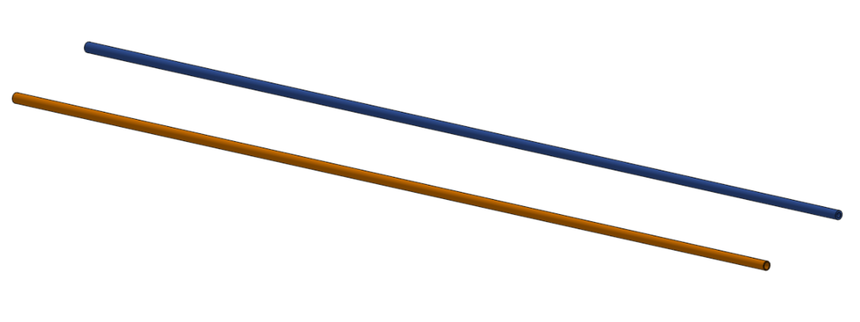
このセッションでは、解析結果に及ぼすメッシュタイプの影響を確認してみました。まず、中空のロッド状 (ゴルフクラブのシャフトのようなイメージしてください) の 3D モデルを 2 種類用意しました。長さ 600 mm で、元部分の外径が 6 mm から先端部にかけて外径が 4 mm に細くなるテーパー形状の物体です。肉厚は、均一に 1 mm のケースと元部分が 1 mm で、先端に行くにつれて 0.5 mm に徐々に細くなるケースを用意しました。
In this section, the effect of the mesh type on the analysis results was studied. First, two types of hollow-rod-shaped 3D-models (please imagine the shaft of a golf club) were prepared. They were 600 mm long and tapered, with an outer diameter of 6 mm at the bottom and 4 mm at the tip. There were two cases for the wall thickness: one with a uniform thickness of 1 mm and the other with a thickness of 1 mm at the bottom that gradually thinned to 0.5 mm at the tip.
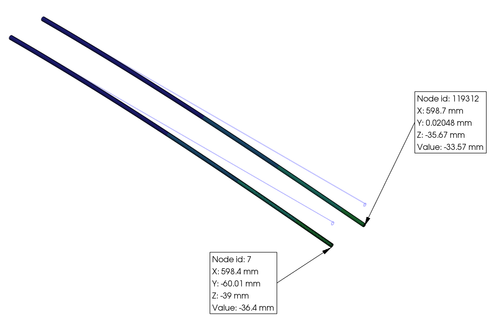
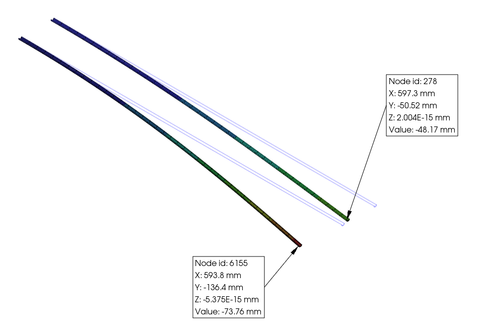
Using PrePoMax, these parts were meshed with "tetrahedral Gmsh" and "transfinite Mesh," then simulated using nonlinear geometrical static analysis. The surface corresponding to the base was fully constrained, and a downward force of 0.02 N was applied to the surface corresponding to the tip. However, when transfinite elements were used for meshing, the rod was divided in half at the center, and symmetry conditions were applied during meshing. In this case, the load condition was set to 0.01 N. The material used was 2014 Alloy (FM: 73,000 MPa, Poisson's ratio: 0.33) selected from the PerPomax database.
The resulting displacement contour plots in the load direction are shown below. The left plot is for “tetrahedral Gmsh,” and the right plot is for “transfinite Mesh.”
認識にくいと思われますので、一覧表として下に示します。Since it may be difficult to describe, I have provided a list below.
I understand that the differences in results above are extreme examples, but what do you think? Which case do you think is closer to reality? I would appreciate your opinion. Starting this time, I've added a link to a simple board at the end of each page where you can post your opinions and feedback. While this is still a trial initiative, I encourage you to share your candid thoughts. (Jan. 13, 2026)
Simple Calculation (Episode 34: Temperature Unit Conversion)
As mentioned on page 01, I presented my example of how to consider the initial settings of the conditions for the first attempt at a plastic injection molding trial. At the time, I used Python and Excel, but since it was difficult to implement on the web now, I'm considering using PHP. However, since I don't have any experience with this, I'd like to gradually deepen my understanding and move forward. First, I'd like to make simple calculations possible. First, I tried to make it possible to convert the temperature. Enter a number and click the Cal. button to convert from Fahrenheit to Celsius (top row) and from Celsius to Fahrenheit (bottom row).
I wonder how much time I spent on just this. But it might be fun to build up my knowledge little by little. I believe the true joy of craftsmanship lies in striving to understand everything, digesting it in your own way, and building upon that knowledge. (Jan. 27, 2026)
Simple Calculation (Episode 35: Pressure Unit Conversion)
射出成形の条件設定の際、ウエブサイトを参考にしようと US のサイトで調べる時に、温度や圧力の単位が異なるために戸惑う場合があります。ちなみに、以前アメリカで浅く天気予報を見ていた時、「今日は 0° に下がるから、厳重な注意をお願い・・・」みたいなコメントを耳にしたのですが、その際は、 0° だなんて、それほど厳しい寒さじゃないのに…と思っていましたが、あとで気が付きましたが、それは華氏の単位だったのです。また、「体温測ったら 100° 程度だった」・・・って、水が沸騰する。なんてこともあったりして。摂氏だと何度になるか、Episode 34 で計算してみて下さいね。
そして今回は圧力編です。psi という単位をご存じでしょうか? これは pound per square inch の略で、海外では使用されているケースがあります。また、自転車や車の空気圧とかも、この単位が使われている場合もあると思います。ただ、慣れないとこれが厄介で、直感的に換算しにくかったりもします。そこで今回は MPa との換算をできるようにしてみました。数値を入力して、換算方向を選び、 Calc. ボタンをクリックすると換算します。明日はその下段に表示されます。換算方向の表示は計算後に初期値の psi to MPa に戻りますので、注意ください。(Feb. 10, 2026)
When setting injection molding conditions and looking up information on a US website, the different temperature and pressure units may confuse you. As a side note, while casually checking the weather forecast in the US, I heard a comment like, "It's going to drop to 0° today, so please be extremely careful." At the time, I thought, "0° isn’t that cold," but later realized it was in Fahrenheit. Or, "I took my temperature, and it was about 100°," -that's the temperature at which water boils, isn't it? Let's try calculating the number of degrees Celsius using at Episode 34.
This time, let’s look at the pressure. Are you familiar with the unit psi? It stands for "pound per square inch" and is sometimes used overseas. It is also used to measure the air pressure in bicycles and cars. However, it can be tricky and difficult to convert intuitively if you are not used to it. So, now, I've made it possible to convert to MPa. Enter a value, select the conversion direction, and click the "Calc." button to convert. The value will be displayed below. The conversion direction display will return to the default value of "psi to MPa" after calculation. (Feb. 10, 2026)
Simple Calculation (Episode 36: Area Unit Conversion)
This is somewhat off-topic from injection molding, but there are many cases where people get confused when discussing an area, especially land area. In Japan, we use units such as "tsubo," "tan," and "chobu." While it's fine if you use them normally, it can be hard to imagine for those who don't use them. We have reviewed each unit and compiled the relevant information in the table below.
By the way, the building area of Tokyo Dome is 46,755 m², and the area of Bunkyo Ward, where Tokyo Dome is located, is 11.29 km², so Bunkyo Ward is equivalent to 241 Tokyo Domes. Also, Manhattan in New York has a value equivalent to 1,258, while Kabuki-Cho has a value equivalent to 7.4. It's interesting to try this kind of calculation. (Feb. 18, 2026)
射出成形関連で、もう一つややこしいのが、トン数です。従来日本では、型締力に関してはトン表示が使われてきました。トンは重量の単位ですが、型締め力を表す表記として用いられてきました。例えば、型締力が 100 トンと表記があれば、最大 100,000 kgf の力で型締めが可能であるという意味になります。最近では力を表す単位として明快な N が用いられるようになったので、kN での表示になっています。1 kgf = 9.80665 N ですので、100 トンと表示されていた成形機の型締め力は 980.7 kN ということになります。
そして、ややこしいのが、US Ton (short ton)という表記です。こちらは、アメリカで使われるヤード・ポンド法に基づく質量単位で、2,000 ポンドを意味します。日本で使われるメートル法の場合は、区別のために metric ton と呼んだりします。2000 ポンドは 907.18 kg ですので、100 US Ton は 90.72 metric ton になります。微妙と言えば微妙ですが、知らないと間違いが起こりかねませんので、ご注意を。加えてもうひとつ、long ton という単位も存在します。主に英国で、船舶や農業などで使われているようですが、興味ある方は調べてみて下さいね。(Mar. 13, 2026)
Another confusing aspect regarding injection molding is tonnage. Traditionally, in Japan, mold clamping force has been expressed in tons. Although the ton is a unit of weight, it has been used to express mold clamping force. For example, if a mold clamping force is expressed as 100 tons, it means that the mold can be clamped with a maximum force of 100,000 kgf. Recently, the clear unit of force, N, has come into use for clamping force, so it is usually expressed in kN. Since 1 kgf = 9.80665 N, the mold clamping force of a molding machine previously expressed as 100 tons would be 980.7 kN
And another is the US ton (short ton). This is a unit of mass based on the imperial system used in the United States and equals 2,000 pounds. In Japan, where the metric system is used, it is sometimes called a metric ton to distinguish it. 2,000 pounds is 907.18 kg, so 100 US tons is 90.72 metric tons. It’s a bit tricky, so if you’re not careful, you could make a mistake. There is also another unit called the long ton. It seems to be used mainly in the UK for shipping and agriculture, so if you're interested, please look it up. (Mar. 13, 2026)
On Page 1, I discussed the approach to setting initial conditions for injection molding; however, I was unable to perform the calculations online because I was using Python and Excel. Therefore, I implemented this using PHP. Note that this tool does not generate graphs; the output consists solely of numerical recommendations. In developing this tool, I aimed to generalize the approach as much as possible and incorporated my own judgment based on principles believed to have a limited scope of influence.
And please also note that this is not intended to propose optimal conditions. Rather, it is designed to provide suggested initial settings that are considered highly valid, with the aim of helping you determine the appropriate approach to setting initial conditions for actual trial molding—considering factors such as the material, molding machine, and mold you are using. Once you understand this purpose, you can proceed to the calculation using the following link. (Apr. 06, 2026)
Structural Analysis 19 (Episode 39: Efftec of R Shape, Stress Simulation)
コーナー部の R の大きさを変えて応力解析をしてみました。
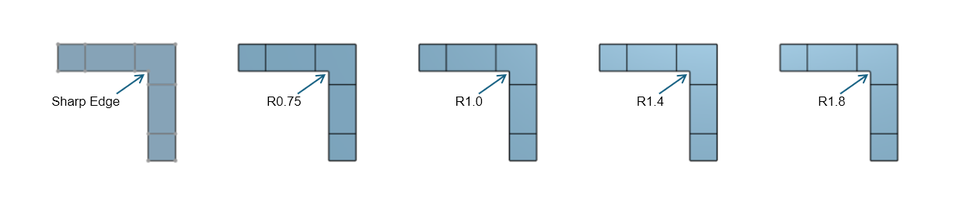
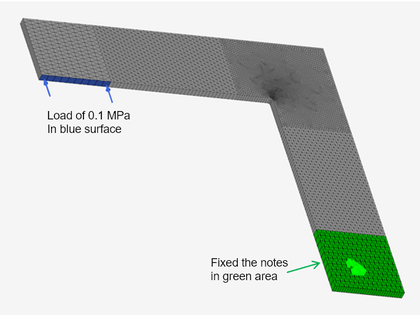
まず、角 R のないシャープエッジのパート、および、R の大きさを 0.75, 1.0, 1.4 , 1.8 mm と変えたパーツを含んだ下図のような 3D モデルを Onshape で作成し、それを PrePoMax にインポートしました (STEP ファイル経由)。暑さは 3.0 mm 均一です。
Stress analysis was performed by changing the corner radius size.
First, a 3D model were created in Onshape, including parts using a sharp edge without a corner radius and with radius sizes of 0.75, 1.0, 1.4, and 1.8 mm, as shown in the figure below, then it was imported into PrePoMax (via STEP file.) The thickness is uniform at 3.0 mm.
After selecting “Extrude type” as the element type and meshing all the parts, the lower portion was fully constrained as shown in the figure on the left, and a pressure of 0.1 MPa was applied to a portion of the inner left face. ABS from the PrePoMax database was used as the material, followed by a static, geometric nonlinear analysis.
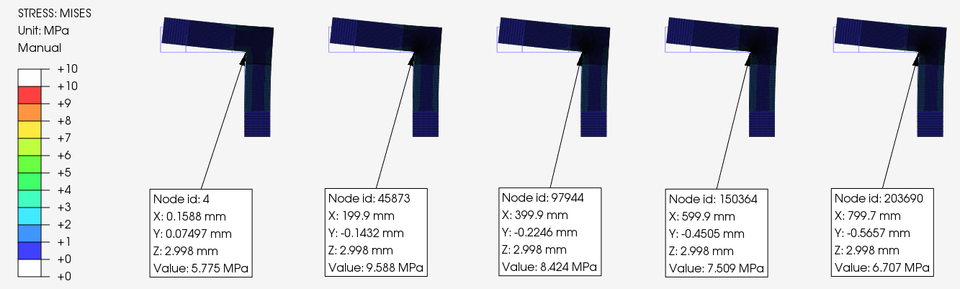
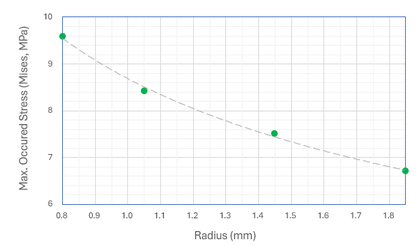
解析結果から、Mises 応力のコンター図をコーナーの根本部分に発生する最大値とともに下図に示します。最大発生応力は R が大きくなるにつれて低減しました。一番左のパートは R 無しですが、本来これが一番高い最大応力値を示すはずですが、これらのパートの中では一番低い値となりました。これは最大応力発生部分に接点が存在しているために、十分な精度が出ていないと推測されます。したがって、発生応力に注目したい箇所では R を省略出来ないということになります。必要十分にメッシュを細分化して、注意深く離散化しなければなりませんね。
The figure below shows a Mises stress contour plot with maximum value queries based on the analysis results. The maximum stress decreased as R increased. The leftmost part has no radius. Although this section should theoretically exhibit the highest maximum stress value, it had the lowest value among these parts. This is likely due to the presence of a node at the location of maximum stress, which prevents sufficient accuracy. Therefore, R cannot be omitted in areas where stress generated is of particular interest. It is necessary to refine the mesh and perform careful discretization sufficiently.
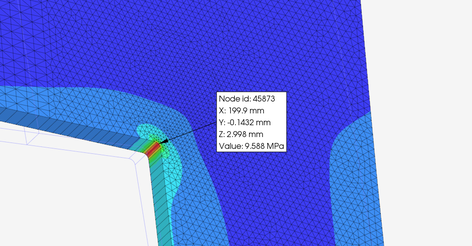
等高線の色が分かりにくいと思いますので、R0.75 mm のパーツのみですが、コーナー部分を拡大して、下図に示します。また、その隣に R の大きさと発生最大応力 (Mises) の関係をプロットしたグラフを示します。ご参考までに。(May 30, 2026)
Since the colors of the contour lines may be difficult to distinguish, I have zoomed in on the corner section, just about R0.75 mm part, and shown it in the figure below. A graph showing the relationship between the R size and the maximum stress (Mises) has also been included. Please use this as a reference. (May 30, 2026)
Structural Analysis 20 (Episode 40: Things we should know)
When considering the results of finite element analysis, there is a crucial point I'd like to highlight. This applies specifically when the analysis is outsourced to a third party: you should never simply accept the results at face value.
Of course, if you conduct the analysis yourself, the responsibility for the judgment lies with you. However, I urge you to thoroughly verify the necessary items and ensure you are fully convinced before making a final decision when reviewing results generated by a third party. This is particularly important for those who may not be very familiar with finite element analysis. While it is tempting to use the results directly as the basis for a decision, the person in charge will ultimately bear the responsibility for that decision. I summarize the items that need verification below.
1. Element Type and Size
Have the appropriate element type and size been selected and configured? The accuracy of the results is significantly influenced by whether the mesh utilizes element types and sizes capable of correctly representing the actual phenomenon being simulated.
2. In the case of crop or cut the FE model
If a partial model is used instead of one that reproduces the entire phenomenon, are the method of truncation and the applied boundary conditions appropriate?
3. Boundary Conditions
To accurately simulate the phenomenon, appropriate boundary conditions must be applied that are suitable for the purpose.
4. Load Conditions
It is also necessary to verify that the load conditions are set correctly. Pay attention not only to the magnitude of the load but also to its units. Furthermore, when using a symmetric model, it is particularly important to verify that the magnitude of the load is appropriate.
5. Contact Conditions
In addition to the contact range, friction coefficient, and other settings, attention must be paid to the size of the mesh within the contact area—specifically, ensuring that nodes do not penetrate into the adjacent mesh.
6. Material Properties
It may be difficult to verify whether the specified material properties are appropriate, but please obtain as much information as possible, such as the source database from which they were obtained.
7. Analysis Steps
Determine whether the analysis is linear or nonlinear. If nonlinear, verify details such as the increment method. Furthermore, if possible, verify the type of solver being used.
I’ve listed the main points here, but there may be others depending on the type of analysis. I won’t go into detail here about how to determine whether the items listed above are appropriate. Since this site cannot cover all such details, please look into them yourself if you have any questions.